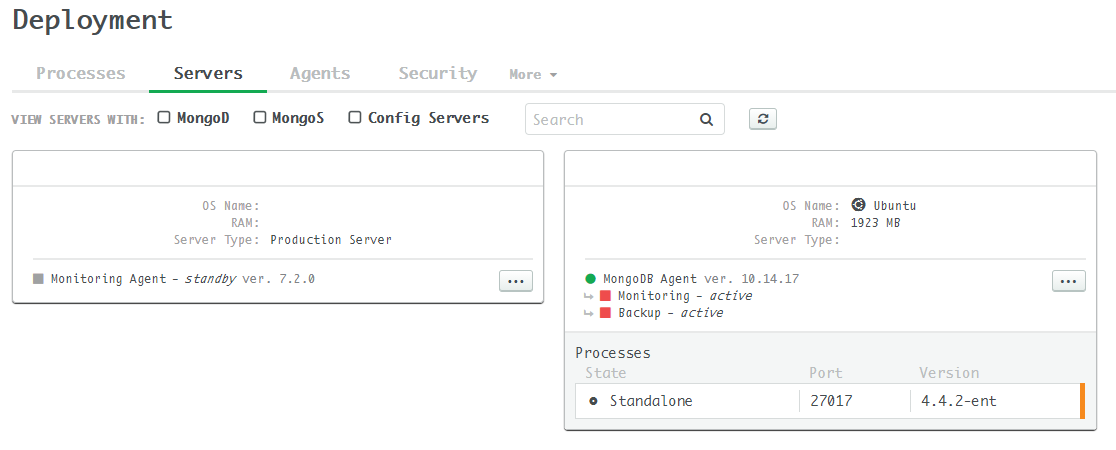
Today I try to import an existing MongoDB deployment (out of the kubernetes cluster) into MongoDB Ops Manager which is running in kubernetes. After installing MongoDB Agent to the deployment, only automation functionality works while monitoring and backup not work. The root cause is that the agent still try to post data into Ops Manager’s internal endpoint.
The latest MongoDB Agent consists of a single binary that contains all three functions: Automation, Monitoring, and Backup. So theoretically install and configure the all-in-one automation agent in the deployment VM is enough.
Configure the automation agent according to
this
, edit mmsBaseUrl in /etc/mongodb-mms/automation-agent.config (assume our Ops Manager public url is http://myopsmanager.com:8080, other fields such as mmsApiKey are omitted here):
1
2
3
| ...
mmsBaseUrl=http://myopsmanager.com:8080
...
|
Startthe automation agent service:
1
| $ systemctl start mongodb-mms-automation-agent.service
|
Verify the agent in the Ops Manager and import the deployment. In the Ops Manager server page, only automation is green, while monitoring and backup functionality is still grey (standby).

Check the backup agent log in the deployment VM:
 1
 2
 3
 4
 5
 6
 7
 8
 9
10
11
12
13
14
15
16
17
18
19
20
21
22
23
24
25
26
27
| /var/log/mongodb-mms-automation$ cat backup-agent.log
[2021-01-20T07:49:51.245+0000] [header.info] [::0] AgentVersion = 10.14.17.6445
[2021-01-20T07:49:51.245+0000] [header.info] [::0] GitCommitHash = 0000000000000000000000000000000000000000
[2021-01-20T07:49:51.245+0000] [header.info] [::0] ManagedAgent = true
[2021-01-20T07:49:51.245+0000] [header.info] [::0] GoVersion = go1.14.7
[2021-01-20T07:49:51.245+0000] [header.info] [::0] mothership = ops-manager-svc.mongodb.svc.cluster.local:8080
[2021-01-20T07:49:51.245+0000] [header.info] [::0] https = false
[2021-01-20T07:49:51.245+0000] [header.info] [::0] httpProxy = <unset>
[2021-01-20T07:49:51.245+0000] [header.info] [::0] krb5Principal = <unset>
[2021-01-20T07:49:51.245+0000] [header.info] [::0] krb5Keytab = <unset>
[2021-01-20T07:49:51.245+0000] [header.info] [::0] krb5ConfigLocation = <unset>
[2021-01-20T07:49:51.245+0000] [header.info] [::0] gssapiServiceName = <unset>
[2021-01-20T07:49:51.245+0000] [header.info] [::0] sslClientCertificate = <unset>
[2021-01-20T07:49:51.245+0000] [header.info] [::0] sslTrustedServerCertificates = <unset>
[2021-01-20T07:49:51.245+0000] [header.info] [::0] sslRequireValidServerCertificates = <unset>
[2021-01-20T07:49:51.245+0000] [header.info] [::0] sslTrustedMMSBackupServerCertificate = <unset>
[2021-01-20T07:49:51.245+0000] [header.info] [::0] logFile = /var/log/mongodb-mms-automation/backup-agent.log
[2021-01-20T07:49:51.245+0000] [header.info] [::0] maxLogFileSizeBytes = 104857600
[2021-01-20T07:49:51.245+0000] [header.info] [::0] maxLogFileDurationHrs = 240
[2021-01-20T07:49:51.245+0000] [header.info] [::0] enableKeepAlive = <unset>
[2021-01-20T07:49:51.245+0000] [header.info] [::0] keepAliveDuration = <unset>
[2021-01-20T07:49:51.245+0000] [header.info] [::0] connDeadline = <unset>
[2021-01-20T07:49:51.245+0000] [header.info] [::0] mothershipResponseHeaderTimeout = <unset>
[2021-01-20T07:49:51.444+0000] [agent.info] [backupexecutor/executor.go:Execute:75] Starting backup module version 10.14.17.6445 0000000000000000000000000000000000000000
[2021-01-20T07:49:51.492+0000] [agent.info] [commonbackup/utils.go:func1:217] Listen for shutdown signal
[2021-01-20T07:49:51.494+0000] [agent.warn] [components/agent.go:Iterate:69] Unable to load latest configuration from server. Will try again. Tag: unassigned Err: Op: Get Err: dial tcp: lookup ops-manager-svc.mongodb.svc.cluster.local: Temporary failure in name resolution
[2021-01-20T07:50:50.713+0000] [agent.warn] [components/agent.go:Iterate:69] Unable to load latest configuration from server. Will try again. Tag: unassigned Err: Op: Get Err: dial tcp: lookup ops-manager-svc.mongodb.svc.cluster.local: Temporary failure in name resolution
|
Check the monitoring agent log:
 1
 2
 3
 4
 5
 6
 7
 8
 9
10
11
12
13
14
15
16
17
18
19
20
21
22
23
24
25
26
| /var/log/mongodb-mms-automation$ cat monitoring-agent.log
[2021-01-20T07:49:51.248+0000] [header.info] [::0] AgentVersion = 10.14.17.6445
[2021-01-20T07:49:51.248+0000] [header.info] [::0] GitCommitHash = 0000000000000000000000000000000000000000
[2021-01-20T07:49:51.248+0000] [header.info] [::0] ManagedAgent = true
[2021-01-20T07:49:51.248+0000] [header.info] [::0] GoVersion = go1.14.7
...
[2021-01-20T07:49:51.248+0000] [header.info] [::0] maxProfilingEntries = <unset>
[2021-01-20T07:49:51.248+0000] [header.info] [::0] mmsBaseUrl = http://ops-manager-svc.mongodb.svc.cluster.local:8080
[2021-01-20T07:49:51.248+0000] [header.info] [::0] logFile = /var/log/mongodb-mms-automation/monitoring-agent.log
[2021-01-20T07:49:51.248+0000] [header.info] [::0] maxLogFileSizeBytes = 104857600
[2021-01-20T07:49:51.248+0000] [header.info] [::0] maxLogFileDurationHrs = 240
[2021-01-20T07:49:51.248+0000] [header.info] [::0] useWindowsEventLog = <unset>
[2021-01-20T07:49:51.248+0000] [header.info] [::0] zlibCompressionLevel = <unset>
[2021-01-20T07:49:51.444+0000] [agent.info] [monitoringexecutor/executor.go:Execute:99] Starting monitoring module
[2021-01-20T07:49:51.444+0000] [services.compressor.info] [monitoring/encoding.go:NewPoolingZlibCompressor:243] Starting 2 compressor handlers
[2021-01-20T07:49:51.444+0000] [agent.info] [monitoring/agent.go:NewOnlineAgent:288] Creating generic consumer pool with a limit of 4 consumers
[2021-01-20T07:49:51.490+0000] [agent.error] [monitoring/agent.go:Iterate:171] Failed to fetch Conf
Failure getting conf. Op: Get Err: dial tcp: lookup ops-manager-svc.mongodb.svc.cluster.local: Temporary failure in name resolution
at cm/monitoring/server.go:167
at cm/monitoring/server.go:219
at cm/monitoring/agent.go:169
at cm/monitoring/agent.go:261
at monitoring/monitoringexecutor/executor.go:125
at louisaberger/procexec/concurrency.go:45
at src/runtime/asm_amd64.s:1373
[2021-01-20T07:49:51.490+0000] [agent.info] [monitoring/agent.go:Run:266] Done. Sleeping for 27s...
|
Obviously, the monitoring and the backup modules are still using internal ops manager URL. However, I don’t find anywhere else to configure the mmsBaseUrl except /etc/mongodb-mms/automation-agent.config.
Since MongoDB Agent is not open-sourced, we cannot figure out how it get mmsBaseUrl.
A simple workaround is to use hosts file to map the internal endpoint to the Ops Manager service public IP (e.g. myopsmanager.com IP), edit /etc/hosts:
1
| xxx.xxx.xxx.xxx ops-manager-svc.mongodb.svc.cluster.local
|
And it works.