Deploy MongoDB Sharded Cluster by Ops Manager
MongoDB sharded cluster is the most complicated architecture. The deployment of sharded cluster in Kubernetes is relatively hard. We will go through the deployment process by MongoDB Ops Manager in this post.
Before start, please go through the Create a UserDB ReplicaSet first.
A MongoDB sharded cluster consists of the following components:
- shard : Each shard contains a subset of the sharded data. Each shard can be deployed as a replica set .
- mongos
: The
mongosacts as a query router, providing an interface between client applications and the sharded cluster. - config servers : Config servers store metadata and configuration settings for the cluster.
In this post, we are going to create a sharded cluster with 2 shards (3 instances replica set), 2 mongos and 3 config servers.
MongoDB Ops Manager Series:
- Install MongoDB Ops Manager
- Create a UserDB ReplicaSet
- Expose UserDB to Public
- Openssl Generates Self-signed Certificates
- Enable UserDB TLS and Auth
Create a Sharded Cluster
The creation of public API key is omitted here. Please refer to this post .
Basically, the creation process consists of 3 steps. It seems that the SSL migration plan created by the Ops Manager has bugs. Because of this, if we deploy the sharded cluster as deploying the replica set, we will stuck at TLS updating (explain in detail later).
Steps:
- Initial deployment, set
mongodsPerShardCountto 1, make each shard contains only one server - Create self-signed certificates and enable TLS in the cluster
- Set
mongodsPerShardCountto 3 and update cluster to make each shard a three instances cluster
Initial Deployment
Create a file sharddb-step1.yaml:
| |
Explanation:
- DO NOT add
securitysection in this step. Otherwise, the TLS update process will be failed. - We will expose the cluster to public by creating mongos service instead of NodePort. Therefore,
exposedExternallyis set to false. - Sample usage of shardPodSpec, configSrvPodSpec and mongosPodSpec is shown above. Refer to: [MongoDB Database Resource Specification]( https://docs.mongodb.com/kubernetes-operator/master/reference/k8s-operator-specification/ )
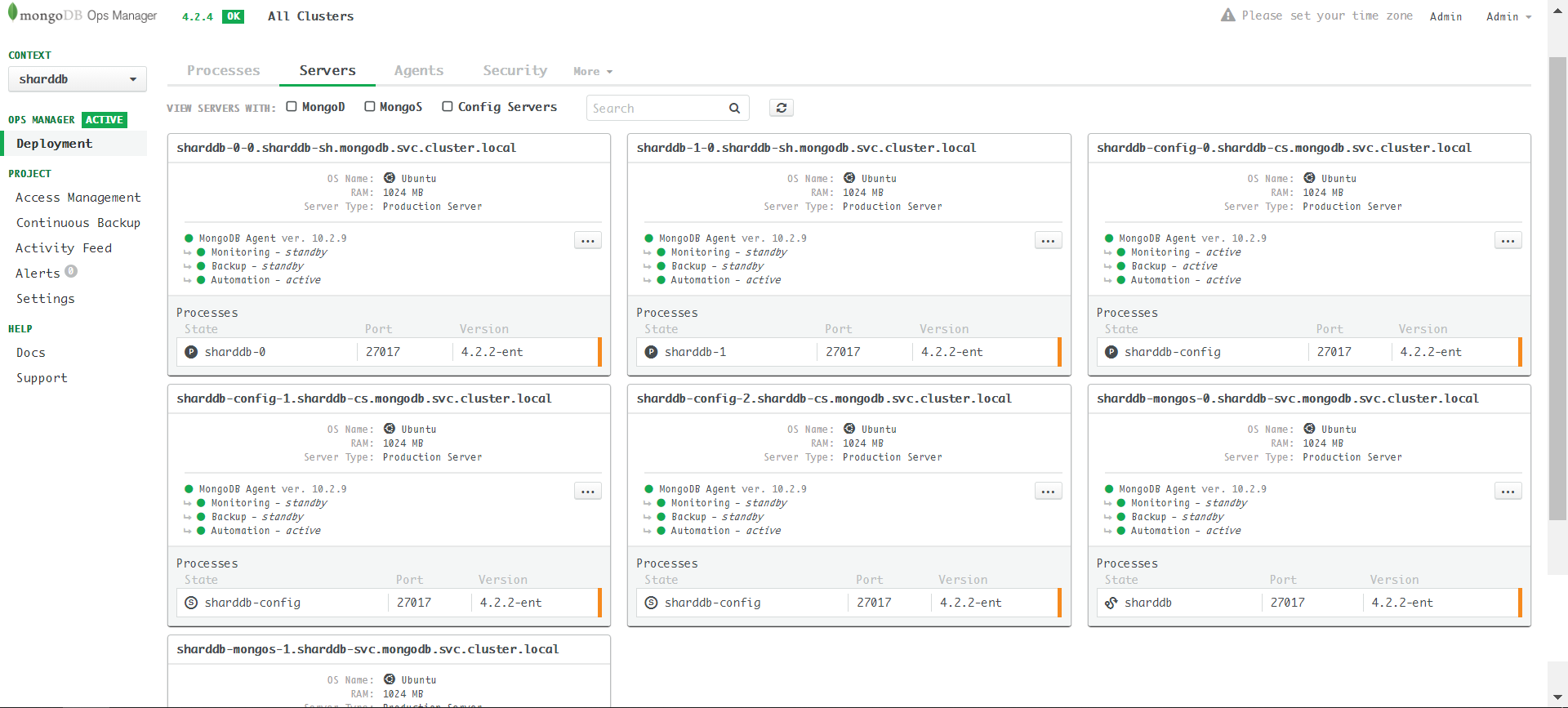
Apply the yaml and we will see seven servers in the Ops Manager server page:
Expose mongos Service
In order to access the cluster from the Internet, we need to create a service for every mongos. Refer to: Don’t Use Load Balancer In front of Mongos
Apply sharddbmongosservice.yaml:
| |
Create Server Certificates
CA Creation: Openssl Generates Self-signed Certificates
Config server.cnf
The demo cluster consists of 11 servers: 2 * 3 = 6 shard servers, 2 mongos servers and 3 config servers.
The servers’ external/internal endpoints:
| |
Use wildcard to make it more compact:
DO NOT write them like this as it doesn’t work:
Refer to: # Common SSL Certificate Errors and How to Fix Them
Subdomain SANs are applicable to all host names extending the Common Name by one level. For example: support.domain.com could be a Subdomain SAN for a certificate with the Common Name domain.com advanced.support.domain.com could NOT be covered by a Subdomain SAN in a certificate issued to domain.com, as it is not a direct subdomain of domain.com
Final version of server.cnf:
| |
Generate Server Certificate
Use the following 4 commands to generate private key server.key, signed it by the rootca.key and create server.pem:
| |
Sample output reference: Openssl Generates Self-signed Certificates
Copy to Get 11 Server Certificates
Rename the files by rules:
| File | Save as |
|---|---|
| CA | ca-pem |
| Each shard in your sharded cluster | sharddb-<Y>-<X>-pem |
| Each member of your config server replica set | sharddb-config-<X>-pem |
| Each mongos | sharddb-mongos-<X>-pem |
- Replace
<Y>with a 0-based number for the sharded cluster. - Replace
<X>with the member of a shard or replica set.
Create Server Certificate and CA ConfigMap
Create Shards Server Certificate Secret
Create Config Server Certificate Secret
| |
Create Mongos Server Certificate Secret
| |
Create CA ConfigMap
Rename rootca.crt -> ca-pem:
| |
Enable TLS
Refer to: # Configure TLS for a Sharded Cluster
Compared to step1, sharddb-step2.yaml only appends security section. Note that now the mongodsPerShardCount is still 1:
| |
Here the mongodsPerShardCount must be 1. Otherwise, the update operation will stuck when you enable TLS. In short, the reason is that a replica set’s migration plan must be in order, and the servers in the replica set must be updated in the same pace. SSL update plan has 3 steps: disabled -> sslAllowed -> sslPreferred -> sslRequired. If one server updates to sslRequired while others are still disabled, the disabled one cannot connect to the sslRequired server. The whole updating process will stuck. We will explain this issue in the last part.
Apply sharddb-step2.yaml, the Ops Manager will first update the config servers, then the shard servers in reverse order:
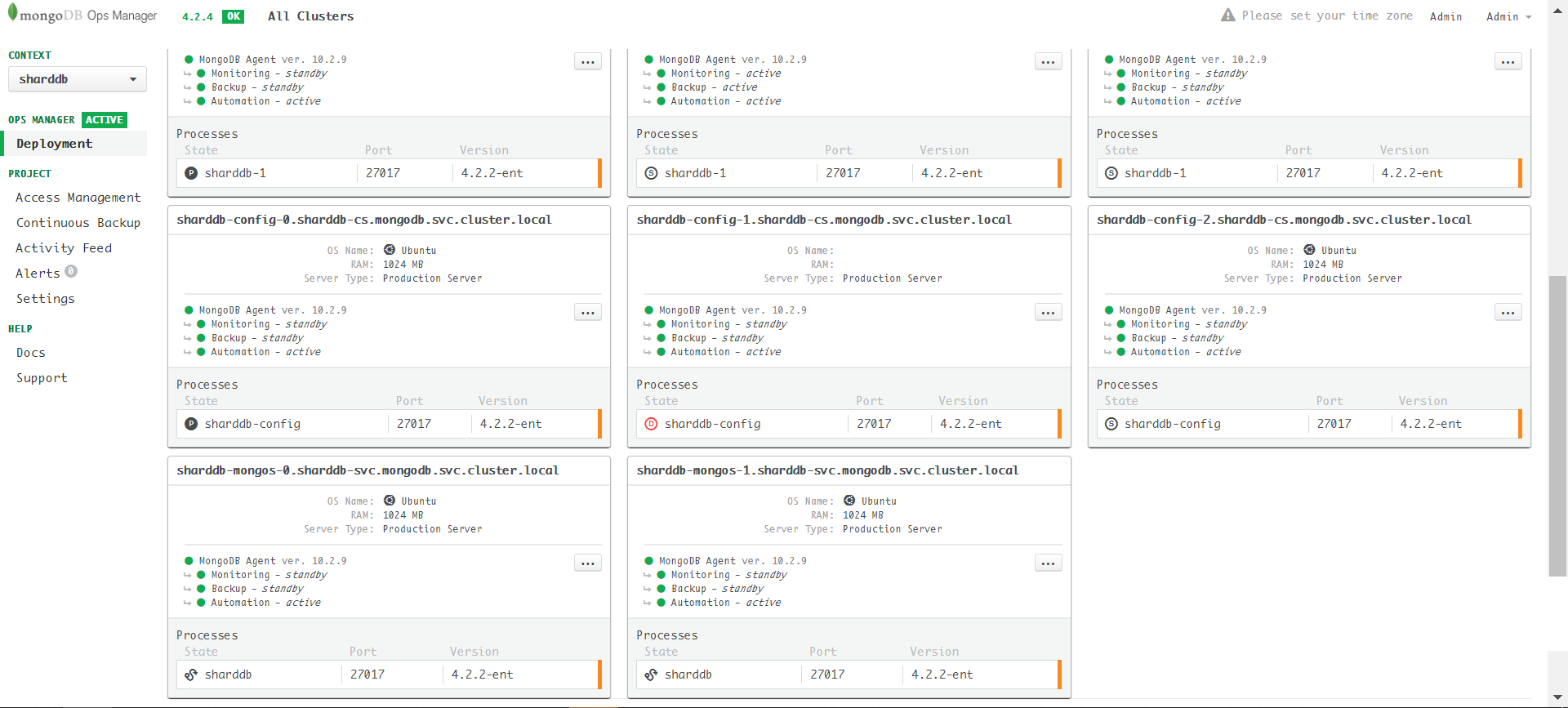
Enable TLS success:
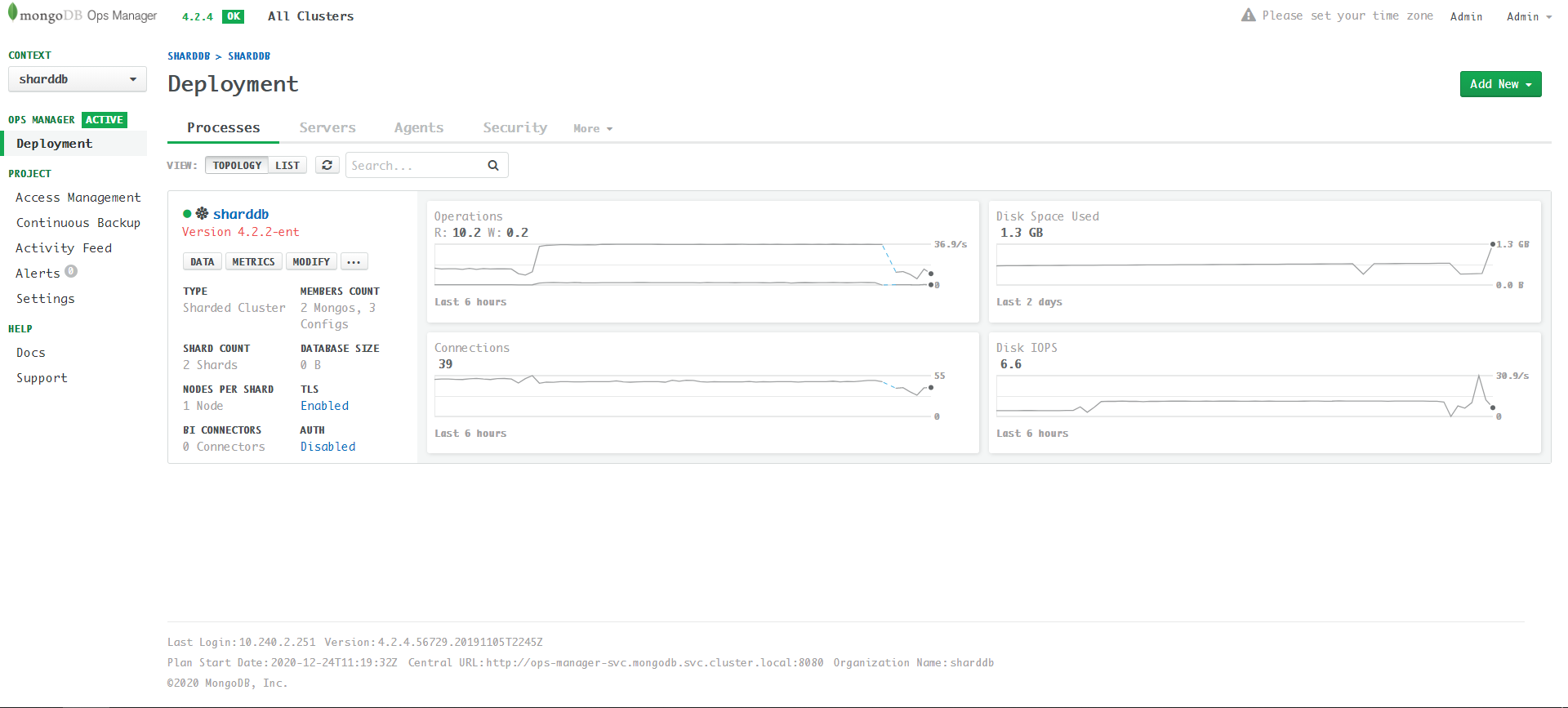
Set mongodsPerShardCount to 3
Compared to step2, sharddb-step3.yaml only changes mongodsPerShardCount:
| |
Apply sharddb-step3.yaml:
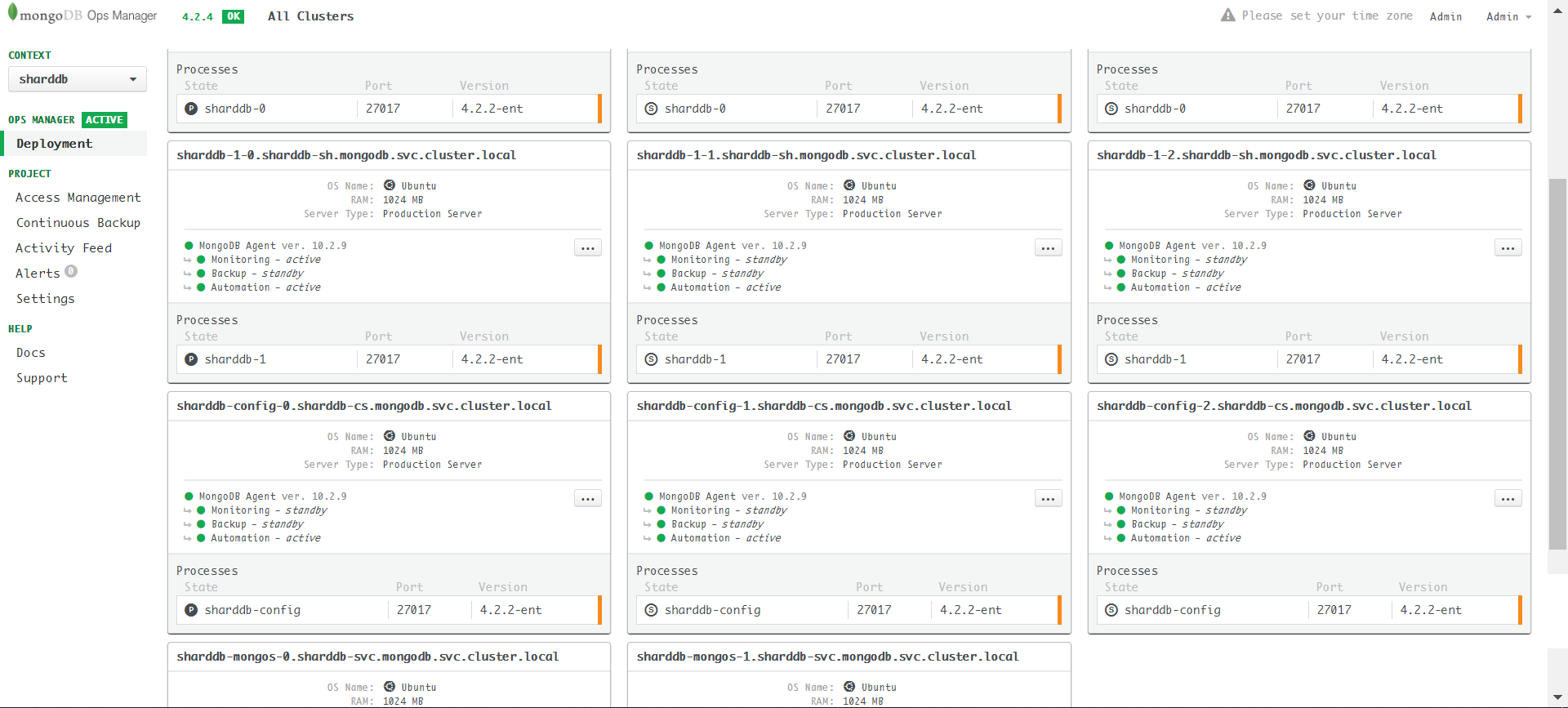
The final status (Enable AUTH from UI):
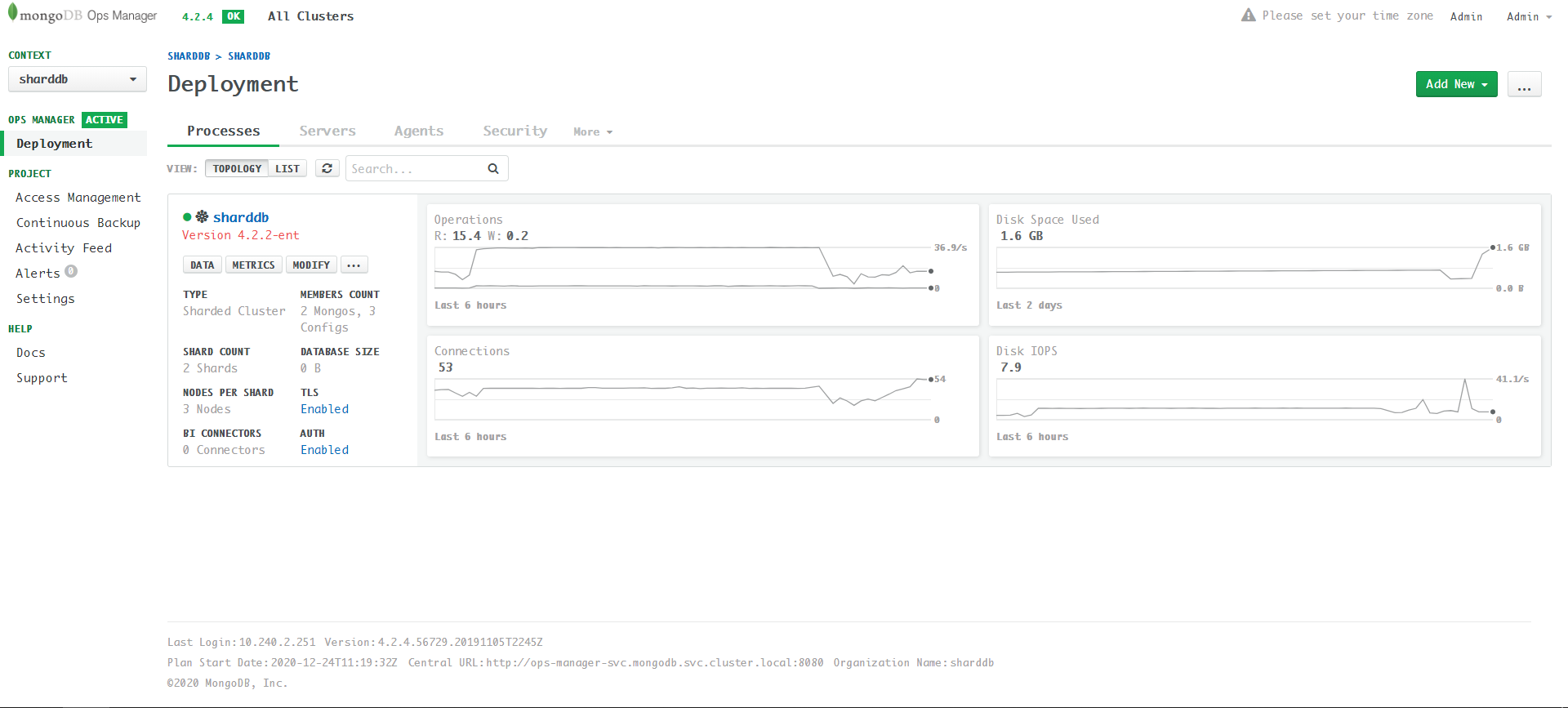
Errors and Solution
Invalid Certificates
If the certificates’ SAN cannot match the server address, the following error happens (view the agent log):
Error checking out client (0x0) for connParam=sharddb-mongos-0.sharddb-svc.mongodb.svc.cluster.local:27017 (local=false) connectMode=SingleConnect : [06:36:25.568] Error dialing to connParams=sharddb-mongos-0.sharddb-svc.mongodb.svc.cluster.local:27017 (local=false): tried 1 identities, but none of them worked. They were ()
Failed to compute states :
[06:36:25.568] Error calling ComputeState : [06:36:25.568] Error getting fickle state for current state : [06:36:25.568] Error checking if mongos = sharddb-mongos-0.sharddb-svc.mongodb.svc.cluster.local:27017 (local=false) is up : [06:36:25.568] Error executing WithClientFor() for cp=sharddb-mongos-0.sharddb-svc.mongodb.svc.cluster.local:27017 (local=false) connectMode=SingleConnect : [06:36:25.568] Error checking out client (0x0) for connParam=sharddb-mongos-0.sharddb-svc.mongodb.svc.cluster.local:27017 (local=false) connectMode=SingleConnect : [06:36:25.568] Error dialing to connParams=sharddb-mongos-0.sharddb-svc.mongodb.svc.cluster.local:27017 (local=false): tried 1 identities, but none of them worked. They were () Failed to planAndExecute :
[06:36:25.568] Failed to compute states : [06:36:25.568] Error calling ComputeState : [06:36:25.568] Error getting fickle state for current state : [06:36:25.568] Error checking if mongos = sharddb-mongos-0.sharddb-svc.mongodb.svc.cluster.local:27017 (local=false) is up : [06:36:25.568] Error executing WithClientFor() for cp=sharddb-mongos-0.sharddb-svc.mongodb.svc.cluster.local:27017 (local=false) connectMode=SingleConnect : [06:36:25.568] Error checking out client (0x0) for connParam=sharddb-mongos-0.sharddb-svc.mongodb.svc.cluster.local:27017 (local=false) connectMode=SingleConnect : [06:36:25.568] Error dialing to connParams=sharddb-mongos-0.sharddb-svc.mongodb.svc.cluster.local:27017 (local=false): tried 1 identities, but none of them worked. They were () Error checking if mongos = sharddb-mongos-0.sharddb-svc.mongodb.svc.cluster.local:27017 (local=false) is up :
[06:36:25.568] Error executing WithClientFor() for cp=sharddb-mongos-0.sharddb-svc.mongodb.svc.cluster.local:27017 (local=false) connectMode=SingleConnect : [06:36:25.568] Error checking out client (0x0) for connParam=sharddb-mongos-0.sharddb-svc.mongodb.svc.cluster.local:27017 (local=false) connectMode=SingleConnect : [06:36:25.568] Error dialing to connParams=sharddb-mongos-0.sharddb-svc.mongodb.svc.cluster.local:27017 (local=false): tried 1 identities, but none of them worked. They were () Error getting fickle state for current state :
[06:36:25.568] Error checking if mongos = sharddb-mongos-0.sharddb-svc.mongodb.svc.cluster.local:27017 (local=false) is up : [06:36:25.568] Error executing WithClientFor() for cp=sharddb-mongos-0.sharddb-svc.mongodb.svc.cluster.local:27017 (local=false) connectMode=SingleConnect : [06:36:25.568] Error checking out client (0x0) for connParam=sharddb-mongos-0.sharddb-svc.mongodb.svc.cluster.local:27017 (local=false) connectMode=SingleConnect : [06:36:25.568] Error dialing to connParams=sharddb-mongos-0.sharddb-svc.mongodb.svc.cluster.local:27017 (local=false): tried 1 identities, but none of them worked. They were () Error calling ComputeState :
[06:36:25.568] Error getting fickle state for current state : [06:36:25.568] Error checking if mongos = sharddb-mongos-0.sharddb-svc.mongodb.svc.cluster.local:27017 (local=false) is up : [06:36:25.568] Error executing WithClientFor() for cp=sharddb-mongos-0.sharddb-svc.mongodb.svc.cluster.local:27017 (local=false) connectMode=SingleConnect : [06:36:25.568] Error checking out client (0x0) for connParam=sharddb-mongos-0.sharddb-svc.mongodb.svc.cluster.local:27017 (local=false) connectMode=SingleConnect : [06:36:25.568] Error dialing to connParams=sharddb-mongos-0.sharddb-svc.mongodb.svc.cluster.local:27017 (local=false): tried 1 identities, but none of them worked. They were () mongod cannot perform Global Update Action because configSvr process = (sharddb-config-2.sharddb-cs.mongodb.svc.cluster.local:27017) is not healthy and done
Similar to replica set deployment, double check server.cnf, re-generate certificates and re-deploy.
Enable TLS when mongodsPerShardCount is 3
The cluster update is stuck:
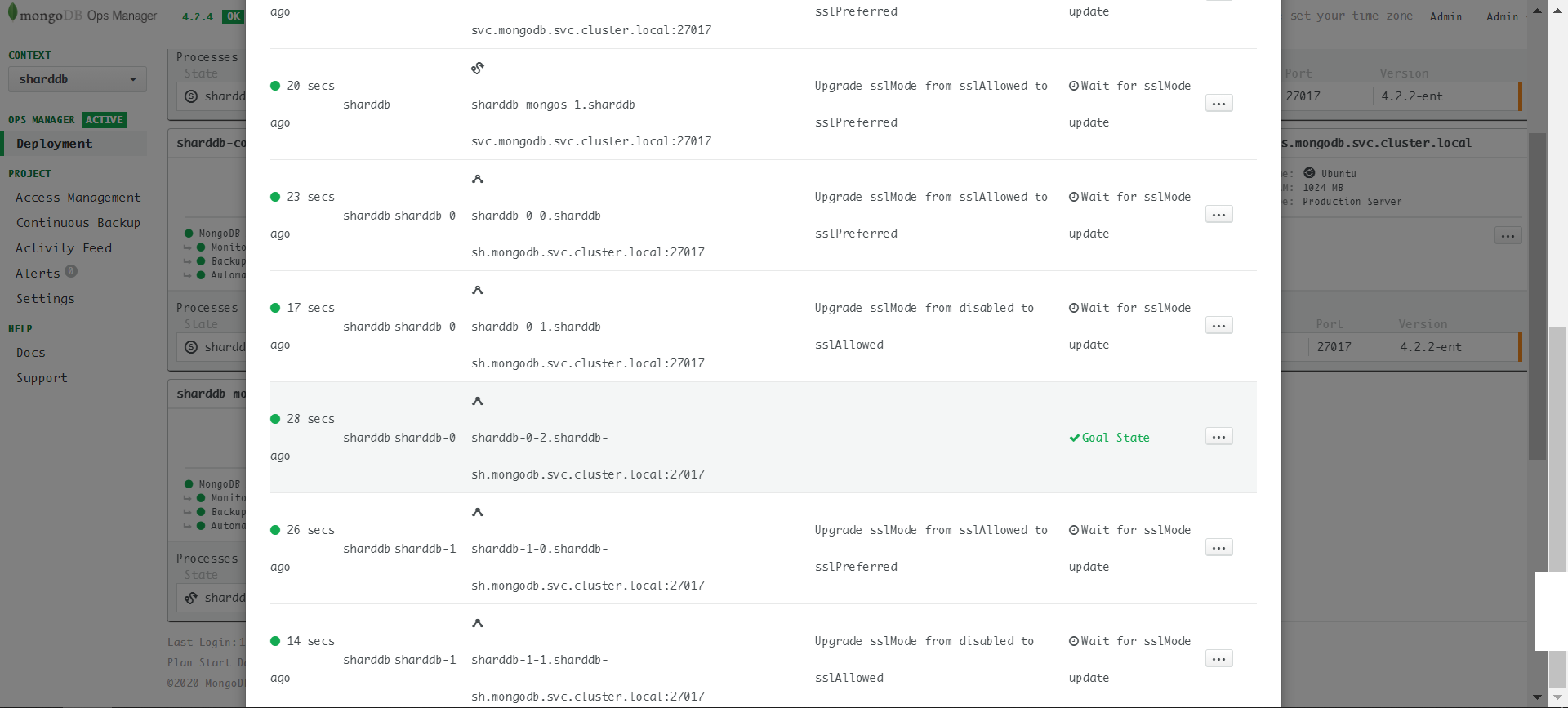
Look at the server log and check if the SSL migration plan is wrong. For example, this is a shard server at the stage of disabled -> sslAllowed:
{“logType”:“automation-agent-verbose”,“contents”:"[2020/12/26 09:19:10.024] [.info] [cm/director/director.go:executePlan:866]
[09:19:10.024] Running step ‘WaitSSLUpdate’ as part of move ‘UpgradeSSLModeFromAllowedToPrefered’"} {“logType”:“automation-agent-verbose”,“contents”:"[2020/12/26 09:19:10.024] [.info] [cm/director/director.go:tracef:771] [09:19:10.024] Precondition of ‘WaitSSLUpdate’ applies because “} {“logType”:“automation-agent-verbose”,“contents”:”[‘currentState.Up’ = true]"} {“logType”:“automation-agent-verbose”,“contents”:"[2020/12/26 09:19:10.024] [.info] [cm/director/director.go:planAndExecute:534] [09:19:10.024] Step=WaitSSLUpdate as part of Move=UpgradeSSLModeFromAllowedToPrefered in plan failed : ."} {“logType”:“automation-agent-verbose”,“contents”:" Recomputing a plan…"} {“logType”:“automation-agent-verbose”,“contents”:"[2020/12/26 09:19:10.132] [.info] [main/components/agent.go:LoadClusterConfig:197] [09:19:10.132] clusterConfig unchanged"} {“logType”:“mongodb”,“contents”:“2020-12-26T09:19:11.078+0000 I NETWORK [listener] connection accepted from 10.240.7.82:40502 #76924 (42 connections now open)”} {“logType”:“mongodb”,“contents”:“2020-12-26T09:19:11.088+0000 W NETWORK [conn76924] no SSL certificate provided by peer”} {“logType”:“automation-agent-verbose”,“contents”:"[2020/12/26 09:19:11.142] [.info] [main/components/agent.go:LoadClusterConfig:197] [09:19:11.142] clusterConfig unchanged"} {“logType”:“mongodb”,“contents”:“2020-12-26T09:19:11.151+0000 I CONNPOOL [Replication] Connecting to sharddb-0-2.sharddb-sh.mongodb.svc.cluster.local:27017”} {“logType”:“automation-agent-stdout”,“contents”:" [09:19:11.158] … process has a plan : UpgradeSSLModeFromAllowedToPrefered,UpgradeSSLModeFromPreferedToRequired"} {“logType”:“automation-agent-stdout”,“contents”:" [09:19:11.158] Running step ‘CheckSSLAllowedAndWantSSLPrefered’ as part of move ‘UpgradeSSLModeFromAllowedToPrefered’"} {“logType”:“automation-agent-verbose”,“contents”:"[2020/12/26 09:19:11.158] [.info] [cm/director/director.go:computePlan:269] [09:19:11.158] … process has a plan : UpgradeSSLModeFromAllowedToPrefered,UpgradeSSLModeFromPreferedToRequired"} {“logType”:“automation-agent-stdout”,“contents”:" [09:19:11.158] Running step ‘WaitSSLUpdate’ as part of move ‘UpgradeSSLModeFromAllowedToPrefered’"} {“logType”:“mongodb”,“contents”:“2020-12-26T09:19:11.161+0000 I REPL_HB [replexec-8] Heartbeat to sharddb-0-2.sharddb-sh.mongodb.svc.cluster.local:27017 failed after 2 retries, response status: HostUnreachable: Connection closed by peer”} {“logType”:“automation-agent-verbose”,“contents”:"[2020/12/26 09:19:11.158] [.info] [cm/director/director.go:executePlan:866] [09:19:11.158] Running step ‘CheckSSLAllowedAndWantSSLPrefered’ as part of move ‘UpgradeSSLModeFromAllowedToPrefered’"} {“logType”:“automation-agent-verbose”,“contents”:"[2020/12/26 09:19:11.158] [.info] [cm/director/director.go:tracef:771] [09:19:11.158] Precondition of ‘CheckSSLAllowedAndWantSSLPrefered’ applies because “} {“logType”:“automation-agent-verbose”,“contents”:"[All the following are true: “} {“logType”:“automation-agent-verbose”,“contents”:” [‘currentState.Up’ = true]”} {“logType”:“automation-agent-verbose”,“contents”:" [All the following are true: “} {“logType”:“automation-agent-verbose”,“contents”:” [All BOUNCE_RESTART process args are equivalent :"} {“logType”:“automation-agent-verbose”,“contents”:" [<‘storage.engine’ is equal: absent in desiredArgs=map[dbPath:/data], and default value=wiredTiger in currentArgs=map[dbPath:/data engine:wiredTiger]>]"} {“logType”:“automation-agent-verbose”,“contents”:" [<‘processManagement’ is equal: absent in desiredArgs=map[net:map[bindIp:0.0.0.0 port:27017 ssl:map[CAFile:/mongodb-automation/ca.pem PEMKeyFile:/mongodb-automation/server.pem allowConnectionsWithoutCertificates:true mode:requireSSL]] replication:map[replSetName:sharddb-0] sharding:map[clusterRole:shardsvr] storage:map[dbPath:/data] systemLog:map[destination:file path:/var/log/mongodb-mms-automation/mongodb.log]], and default value=map[] in currentArgs=map[net:map[bindIp:0.0.0.0 port:27017 ssl:map[CAFile:/mongodb-automation/ca.pem PEMKeyFile:/mongodb-automation/server.pem allowConnectionsWithoutCertificates:true mode:allowSSL]] processManagement:map[] replication:map[replSetName:sharddb-0] sharding:map[clusterRole:shardsvr] storage:map[dbPath:/data engine:wiredTiger] systemLog:map[destination:file path:/var/log/mongodb-mms-automation/mongodb.log]]>]"} {“logType”:“automation-agent-verbose”,“contents”:" ]"} {“logType”:“automation-agent-verbose”,“contents”:" [ ]"} {“logType”:“automation-agent-verbose”,“contents”:" ]"} {“logType”:“automation-agent-verbose”,“contents”:" [‘SSL mode’ = allowSSL]"} {“logType”:“automation-agent-verbose”,“contents”:" [‘SSL mode’ = requireSSL]"} {“logType”:“automation-agent-verbose”,“contents”:"]"}
Look another shard server which is Goal State:
{“logType”:“mongodb”,“contents”:“2020-12-26T09:33:57.679+0000 I NETWORK [conn348143] end connection 10.240.7.120:51662 (19 connections now open)”} {“logType”:“mongodb”,“contents”:“2020-12-26T09:33:57.728+0000 I NETWORK [listener] connection accepted from 10.240.5.150:57414 #348144 (20 connections now open)”} {“logType”:“mongodb”,“contents”:“2020-12-26T09:33:57.728+0000 I NETWORK [conn348144] Error receiving request from client: SSLHandshakeFailed: The server is configured to only allow SSL connections. Ending connection from 10.240.5.150:57414 (connection id: 348144)”} {“logType”:“mongodb”,“contents”:“2020-12-26T09:33:57.728+0000 I NETWORK [conn348144] end connection 10.240.5.150:57414 (19 connections now open)”} {“logType”:“mongodb”,“contents”:“2020-12-26T09:33:57.733+0000 I NETWORK [listener] connection accepted from 10.240.5.150:57416 #348145 (20 connections now open)”} {“logType”:“mongodb”,“contents”:“2020-12-26T09:33:57.733+0000 I NETWORK [conn348145] Error receiving request from client: SSLHandshakeFailed: The server is configured to only allow SSL connections. Ending connection from 10.240.5.150:57416 (connection id: 348145)”}
Apparently, the Goal State server requires TLS while the disabled server not use TLS. Then the connection from the disabled server is rejected. I don’t find a graceful solution to resolve this issue (a bug of MongoDB Kubernetes Operator?). Currently, the only way to bypass this issue is make each shard one instance and increase the instance number after enabling TLS.
Delete Sharded Cluster
If you want to re-deploy the cluster, use this command to delete the cluster:
| |
Note that shard server and config server are stateful as they claim persistent volume (PV). The above command will not delete the PV in Kubernetes. Therefore, you need to delete all PVs to clean up the status.